
Flagvent 2025: Day 23
FV25.23 - Santa's Tune
Difficulty
easy

Categories
fun

Description
santa got more and more interested in composing music himself and he decided to release his first song, which the elves deemed "lit" and a "vibe". unfortunately, he left the sheet on the piano and the grinch scrambled all the notes! the music doesn't sound good anymore, it's just black and white keys. santa is trying to give a Quick Response and although he's squaring his shoulders, he needs your help!

Author
kuyayaSolution
The files we were given today included only one item: flagvent.musicxml. This is a MusicXML file that contains information about a piece of music.
Luckily, we have MuseScore Studio installed, so we can open it and take a closer look at the sheet music:
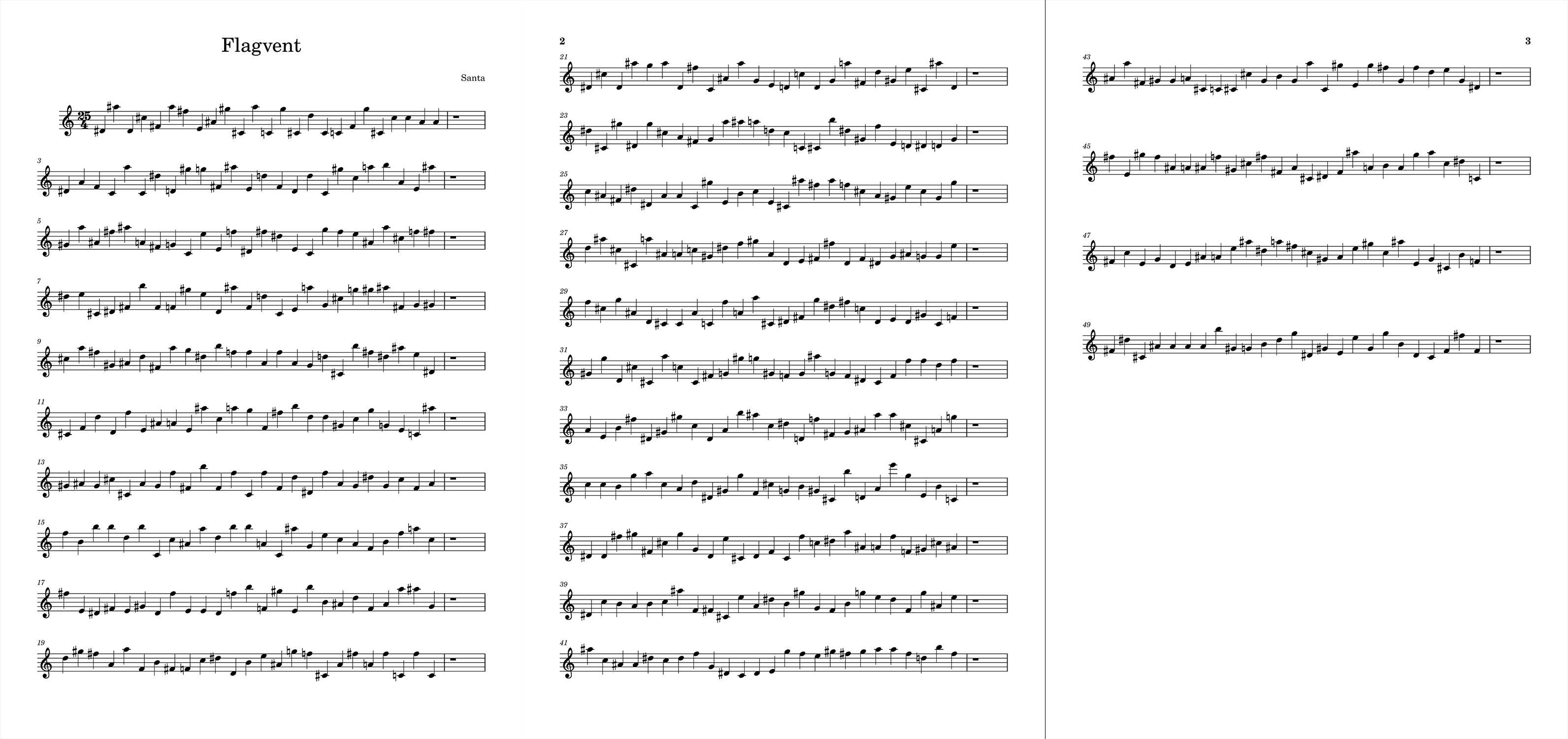
Based on the challenge description, which mentions Santa trying to give a "Quick Response", we assumed we needed to create a QR code. The piece has 25 measures (labelled with odd numbers: 1, 3, 5, up to 49), and each measure contains 25 notes. That maps neatly to a Version 2 QR code, which has a 25×25 module grid.
Next, we needed to decide how each note maps to a 1 or a 0 for the QR code. We noticed that some notes are sharp (#), which means they’re played on the black keys, while others are natural and played on the white keys. Given how QR codes are structured, and that the very first measure starts with sharp notes, we treated sharp notes as 1 and natural notes as 0.
Now we can write a script to parse the MusicXML file, build a binary grid, and generate a QR code image:
import sys
from PIL import Image
import xml.etree.ElementTree as ET

def generate_qr_image(grid, output_filename="qr-code.png", scale=20):
    if not grid:
        return

    height = len(grid)
    width = len(grid[0])

    img = Image.new('L', (width, height), color=255)
    pixels = img.load()

    for y in range(height):
        for x in range(width):
            bit = grid[y][x]
            if bit == 1:
                pixels[x, y] = 0 # Black
            else:
                pixels[x, y] = 255 # White

    # Resize for scanability
    new_size = (width * scale, height * scale)
    img = img.resize(new_size, Image.NEAREST)

    img.save(output_filename)

if __name__ == "__main__":
    tree = ET.parse('flagvent.musicxml')
    root = tree.getroot()

    qr_grid = []

    part = root.find(".//part[@id='P1']")
    measures = part.findall("measure")

    row_count = 0

    for measure in measures:
        number = int(measure.get("number"))

        # Only odd measures exist
        if number % 2 == 0:
            continue

        row_bits = []
        notes = measure.findall("note")

        for note in notes:
            if note.find("rest") is not None:
                continue

            accidental = note.find("accidental")

            if accidental is not None and accidental.text == 'sharp':
                row_bits.append(1)
            else:
                row_bits.append(0)

        if row_bits:
            qr_grid.append(row_bits)
            row_count += 1

    generate_qr_image(qr_grid)
Running the script generates the following QR code image:

Scanning the QR code gives us the daily flag!
Flag:
FV25{wh4t_4_l0v3ly_tun3}